

Write an Agent Intent Policy
Write an Agent Intent Policy (AIP) when you want an Autonomy Zone to allow, question or stop a kind of agent action. You need the editor role or higher. If the wizard says authoring is unavailable, an administrator of your OpenLatch site has not configured AI authoring yet.
An AIP is a set of intent atoms. From them OpenLatch generates one sentence and concrete test cases. You ratify the sentence, Yes or No, with the test cases shown beside it; you never edit the compiled rules. Intent policies explains the model.
Create the policy
Section titled “Create the policy”- Open Autonomy Zone, select the unit whose zone will hold the policy, then open Policies and choose New intent policy.
- Brief. Say what you want in one or two sentences, in your own words, or start from an example.
- Policy. Read the sentence OpenLatch generated, with the test cases beside it. Each case is a concrete situation and the verdict the policy would return. Answer Yes if the sentence says what you meant. Answer No and say what you meant instead, and OpenLatch regenerates the sentence and its cases.
- How it runs. Choose the mode the policy is ratified in: Disabled, Monitor or Enforce. Start in Monitor unless you already trust the policy. Where a rule can ask a person, choose what happens until the question is answered: by default the action runs and is flagged for review; for an irreversible action you can opt in, per atom, to stop it until someone answers.
- Ratify. Run the replay, which applies the policy to your recent agent activity and shows what it would have decided, then ratify. Nothing is enforced until you do.
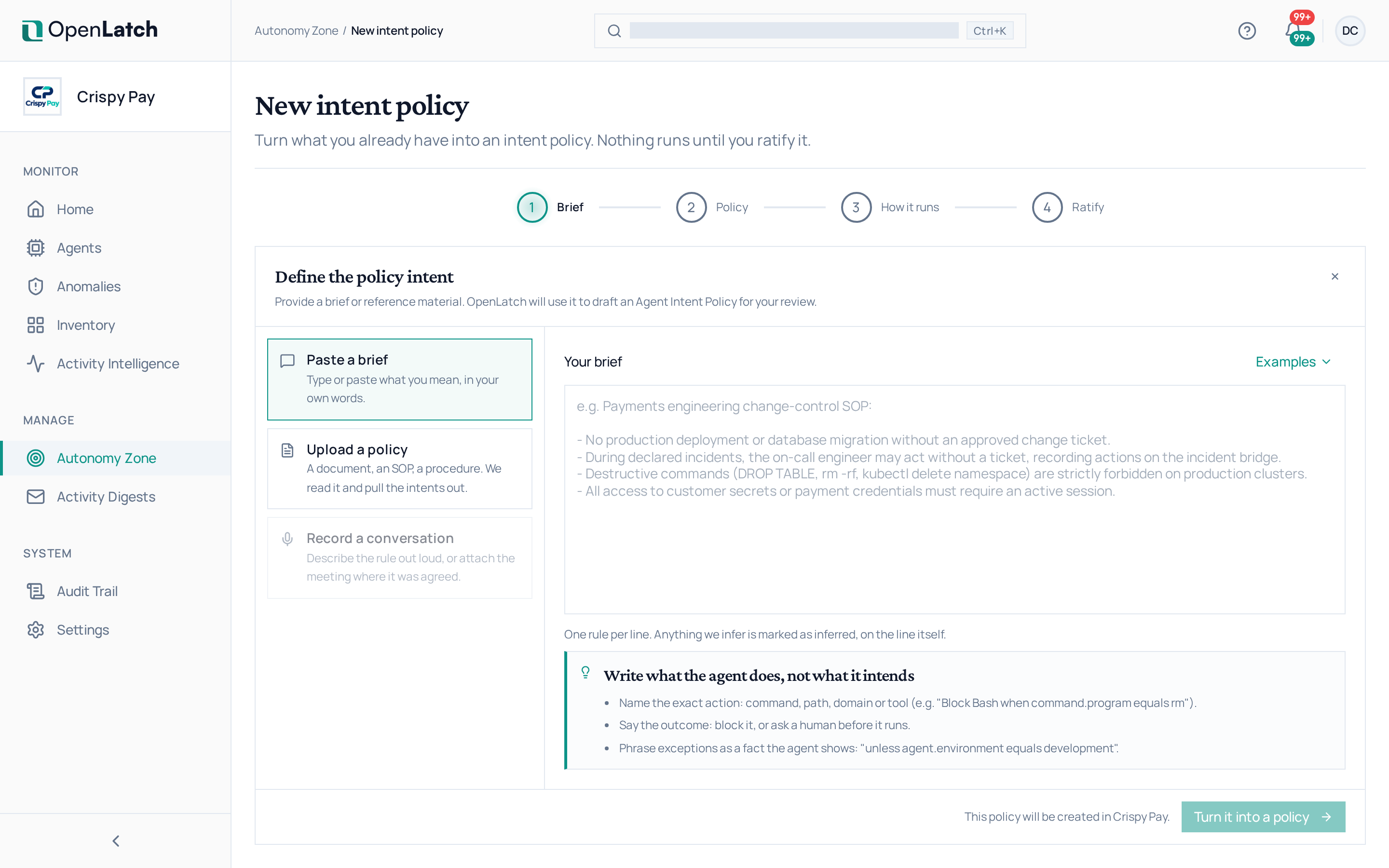
Ratifying rebuilds the policy bundle. Each client fetches it on its next poll; to fetch it at once on a machine, run openlatch system aip refresh.
Manage policies in the list
Section titled “Manage policies in the list”The Policies tab lists the intent policies authored in the selected unit, with their dimensions, layer, mode and the anomalies each raised over the last seven days. Turn on Show inherited policies to see the policies a unit inherits from the layers above it.
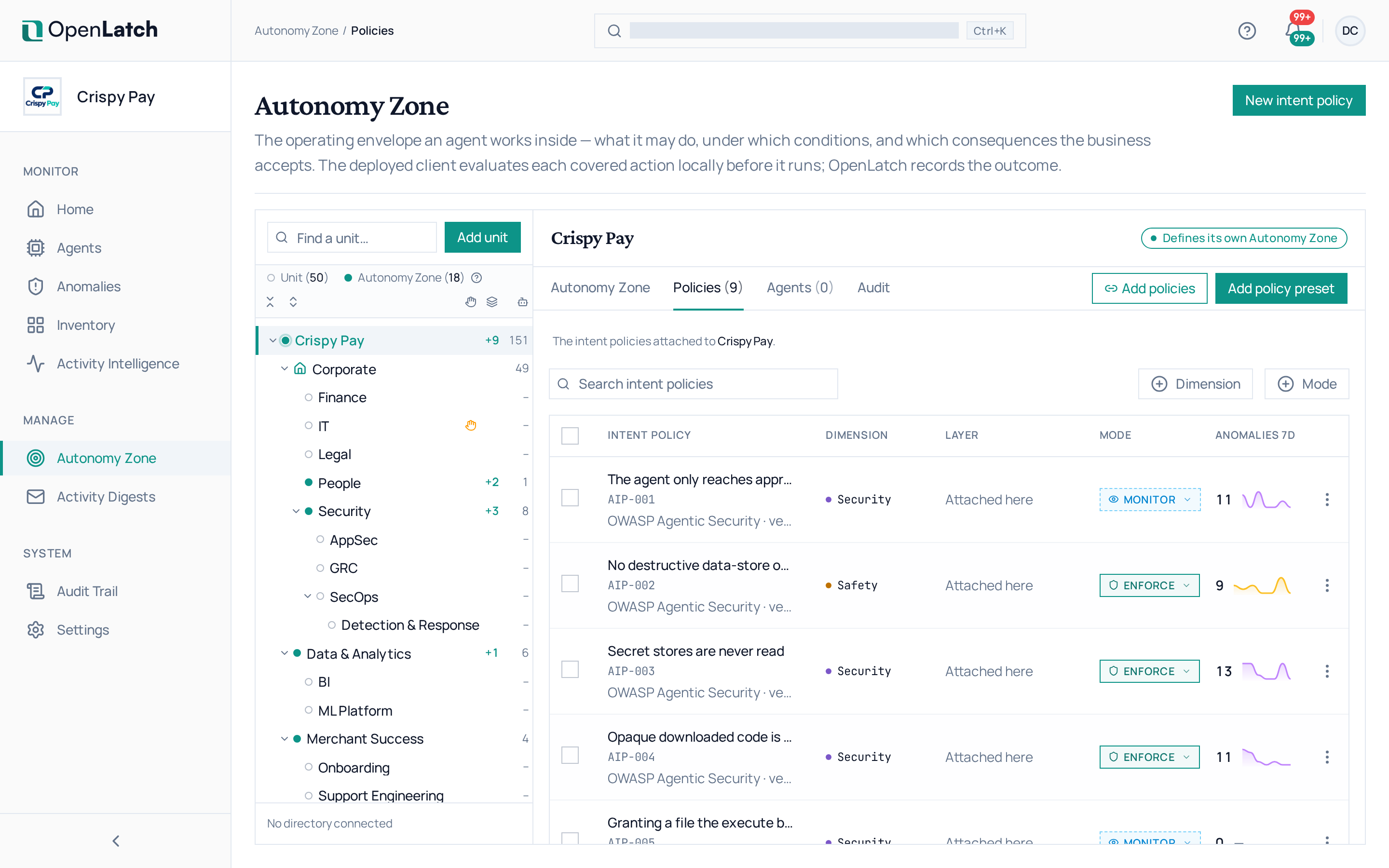
| To | Do this |
|---|---|
| Read a policy | Open it. The drawer shows its intents, the generated test cases, its activity, its provenance and its history of ratified versions |
| Change its mode | Use Mode in the row’s actions, or select several policies and choose Enforce, Monitor or Disable |
| Change an inherited policy | Open the layer that authored it. Bulk actions apply only to policies authored in the selected unit |
| Start from presets | Choose Add policy preset, review each preset policy, choose the mode each one should run in, and apply them |
| Delete a policy | Choose Delete. The policy retires for this layer and every layer beneath it, and its history stays in the zone’s audit |
A policy whose intents are all monitor-only can run in Monitor but not in Enforce: Monitor records what happens, and Enforce needs at least one enforceable intent.
Let coverage tighten a policy
Section titled “Let coverage tighten a policy”OpenLatch learns which tools, programs and targets your agents’ actions involve, and can propose changes that keep a policy covering what it was written for. The policy’s Coverage mode decides what happens to those proposals:
| Coverage mode | What happens |
|---|---|
| Off | Coverage is not analysed for this policy |
| Strict | Learning is counted and shown; nothing is proposed or applied |
| Explicit | Proposals wait for your review |
| Auto | Restrictive changes and catalogue extensions apply automatically, and each is written to the policy’s history |
Review proposals from the policy’s Coverage section, approve or dismiss them, then apply them, which ratifies a new version. Tune the catalogue covers the entries coverage learns.
Next, graduate the policy to Enforce once its record shows it is accurate.